PokiSDK - Construct 3
Made by Ossama Jouini 
Introduction & Features
This is a Poki Plugin made for the Construct 3 Engine. It was designed to help the integration of the PokiSDK into your Construct 3 game.
Features
- A preview project showing the implementation of the SDK through the addon.
- The Poki SDK Construct 3 addon.
Once you install and enable the extension, you will be able to test the PokiSDK integration in preview mode (in browser) and be able to make builds (web-mobile) that can be uploaded to Poki platform.
1. Initialize the SDK
- Download the Source/Release: Download the extension archive poki_sdkV2.
Or download the source code as a zip file.
Once this is done, you can add the extension by going to Menu > View > Addons Manager.
You can download an example project here. In this project, you can find examples of how the Construct 3 Poki SDK can be implemented.
Screenshot
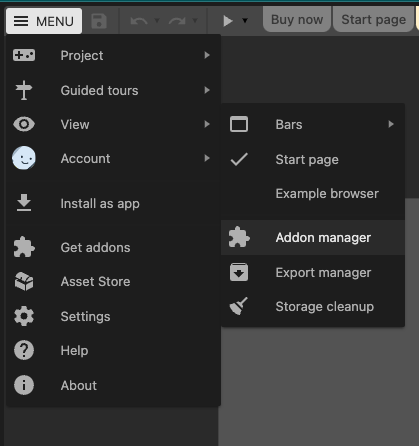
Here you can upload the addon by clicking on Install new addon... and selecting the .c3addon you’ve just downloaded.
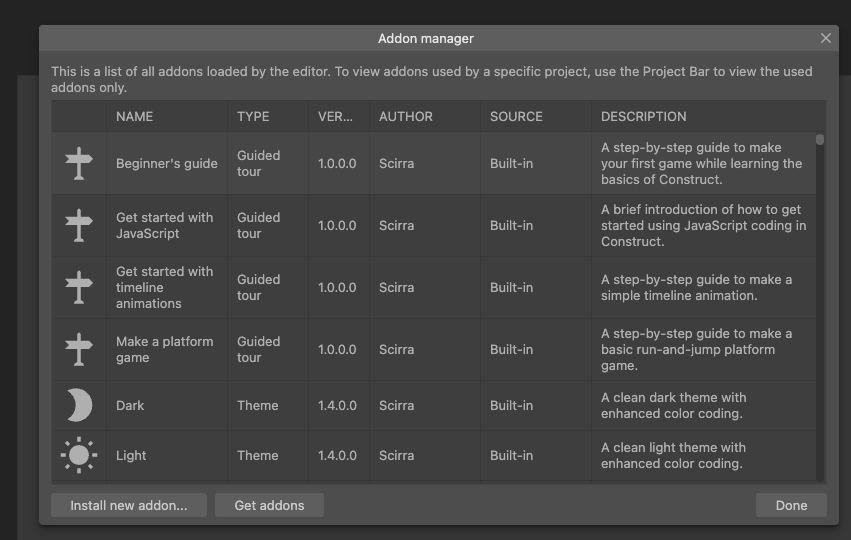
To make sure the extension is enabled, simply refresh the page. The Poki SDK addon should now be visible in your Addon Manager.
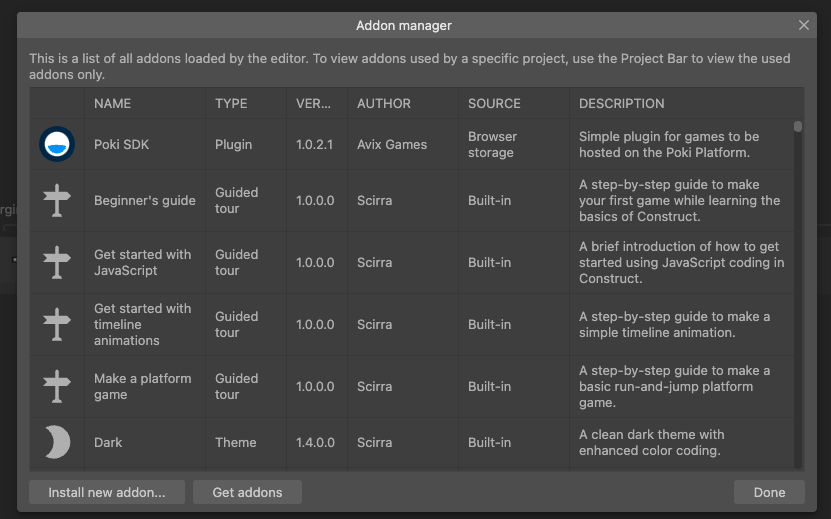
The addon loads and initializes the Poki SDK automatically. You can check that initialization has finished with the SDK Is Loaded condition.
2. Implement the game loading logic
The addon can notify Poki automatically depending on the Loading notification property. If you choose to do this manually, call the Loading End action when your game has finished loading all files and is ready to show the main menu or first playable screen.
3. Implement the gameplay events
Use the  gameplayStart() event to describe when users are playing your game (e.g. level start and unpause).
Use the  gameplayStop() event to describe when users aren’t playing your game (e.g. level finish, game over, pause, quit to menu).
The Construct 3 SDK comes packed with two trigger functions that you can use to implement these events. You can implement these triggers as indicated below to trigger these events in the right locations for your game.

4. Implement commercialBreak
Commercial breaks are used to display video ads and should be triggered on natural breaks in your game. Throughout the rest of your game, we recommend you implement the  commercialBreak() before every gameplayStart() , i.e. whenever the user has shown an intent to continue playing.
For this event, there’s a similar trigger as for the gameplay events.

Important information about commercialBreaks
Not every single commercialBreak() will trigger an ad. Poki’s system will determine when a user is ready for another ad, so feel free to signal as many commercial break opportunities as possible.
5. Implement rewardedBreak
Rewarded breaks allow for a user to choose to watch a rewarded video ad in exchange for a certain benefit in the game (e.g. more coins, etc.). When using  rewardedBreak() , please make it clear to the player beforehand that they’re about to watch an ad.
Be aware when using a rewardedBreak() to check whether the ad was completed. If this is not the case, don’t give the player a reward.
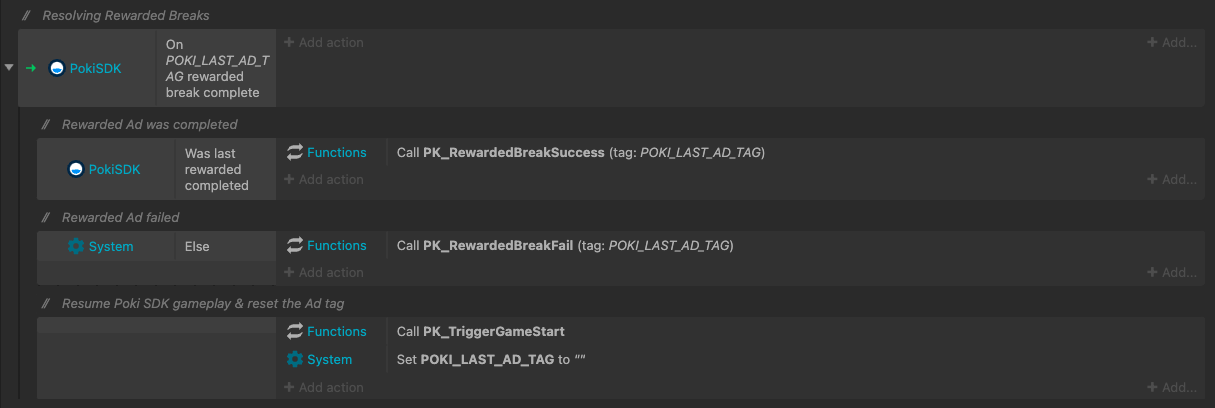
About the rewardedBreak timer
rewardedBreak() affects the timing of commercialBreak() - When a user interacts with a rewarded break, our system’s ad timer is reset to ensure the user does not immediately see another ad.
6. User Accounts
The Construct 3 addon exposes account APIs through actions, conditions, and expressions.
Use Is Logged In and the Username / AvatarUrl expressions after loading to check whether a player is already logged in. Use Login only from a player interaction that requires an account. A successful login can refresh the page, so check the user state again after load.
Condition: Poki SDK > Is Logged In
Action:    [Show account UI]
Expression: Username
Expression: AvatarUrl
Prompt the player to log in from a click or tap:
React to account state changes:
Condition: Poki SDK > On User Changed
Condition: Poki SDK > Is Logged In
Action:    [Use Username and AvatarUrl]
Use Get Token when your game needs to verify the Poki user on your own backend. After the token is fetched, use On Get Token and the Token expression.
You can also handle a failed login:
The token expires in 1 minute. Do not store it or use it for anything other than backend verification. Verify it with GET https://user-vault.poki.com/auth/verify-token using the headers Authorization: Bearer <token> and X-Poki-Team-Api-Key: <team-api-key>. The endpoint returns an immutable, game-specific user_id.
7. Final Steps
Shareable URLs and URL params
To create a shareable Poki URL, pass a JSON string to the Get Shareable URL action. Read the result with the ShareableURL expression.
Action:     Poki SDK > Get Shareable URL
Parameter:  {"id":"myid","type":"mytype","score":28}
Expression: ShareableURL
To read URL parameters from the Poki URL or current URL, use the URLParam expression:
Moving the Poki Pill on mobile
If the Poki Pill overlaps your UI on mobile, reposition it with the Move Pill action.
Top Percent: A value between0and50.Top Pixels: An additional pixel offset.- The Poki default is
Top Percent = 0andTop Pixels = 20.
Upload and test your game in Poki for Developers
Congrats, you’ve successfully implemented the PokiSDK! Now upload your game to the Poki Inspector and test it there. When you’re happy with the implementation, send us a review request and we’ll play the game. Feel free to contact us via developersupport@poki.com if you’re stuck.